Plains Curriculum Materials: What We Have
An assessment of the shared course library and what it makes possible for faculty
Executive summary
Faculty and curriculum staff are regularly asked where a topic is taught, which sessions address a given program objective, or what was used for a session last year or at the other campus. Answering these questions currently means opening folders and workbooks one at a time. The School of Medicine AI Working Group wanted to know whether the Plains Curriculum library could support tools that answer them directly, such as a searchable catalog, slide-level search and curriculum-mapping dashboards. This report describes what the library contains and how well it connects to the curriculum’s planning data.
The library can support those tools, largely because of how the curriculum teams already maintain it. Event folders follow the schedule, the Course Build workbooks use national standard vocabularies, and every learning objective is tagged. Together these make it possible to connect materials to sessions and objectives automatically, without re-cataloguing anything by hand. What remains are decisions about scope, chiefly which courses to include and where the FCB materials are kept, rather than clean-up.
Key findings
- The library holds 4,791 files (74 GB) from six systems courses, covering up to four academic years. Text was extracted from 137,986 slides and pages, speaker notes included, and each passage keeps its slide or page number so it can be cited.
- The Course Build workbooks describe 4,153 scheduled events and 11,387 learning objectives. Of these objectives, 100% are tagged with a Bloom’s level, program objective (MEPO), USMLE system and discipline.
- 89% of teaching files link automatically to their session, and through it to the session’s objectives. For 79%, the folder name or date is enough, because event folders are named after the schedule.
- How complete the library is depends on session type. In AY25-26, most lectures, labs and case sessions have materials here; most small groups, reviews and panels do not.
- In AY25-26, 75% of objectives map to MEPO MK1.1 (medical knowledge), and “Understanding” is the most common Bloom’s level. A few program objectives appear rarely in these six courses.
- Materials are revised often. By course, 55–67% of AY25-26 files were new or substantially changed since AY24-25. FCB has developed much of its own material: 7–21% of FCB files closely match an AMC file.
- A catalog, search and curriculum-mapping dashboards could be built on the library as it stands.
What is in the library
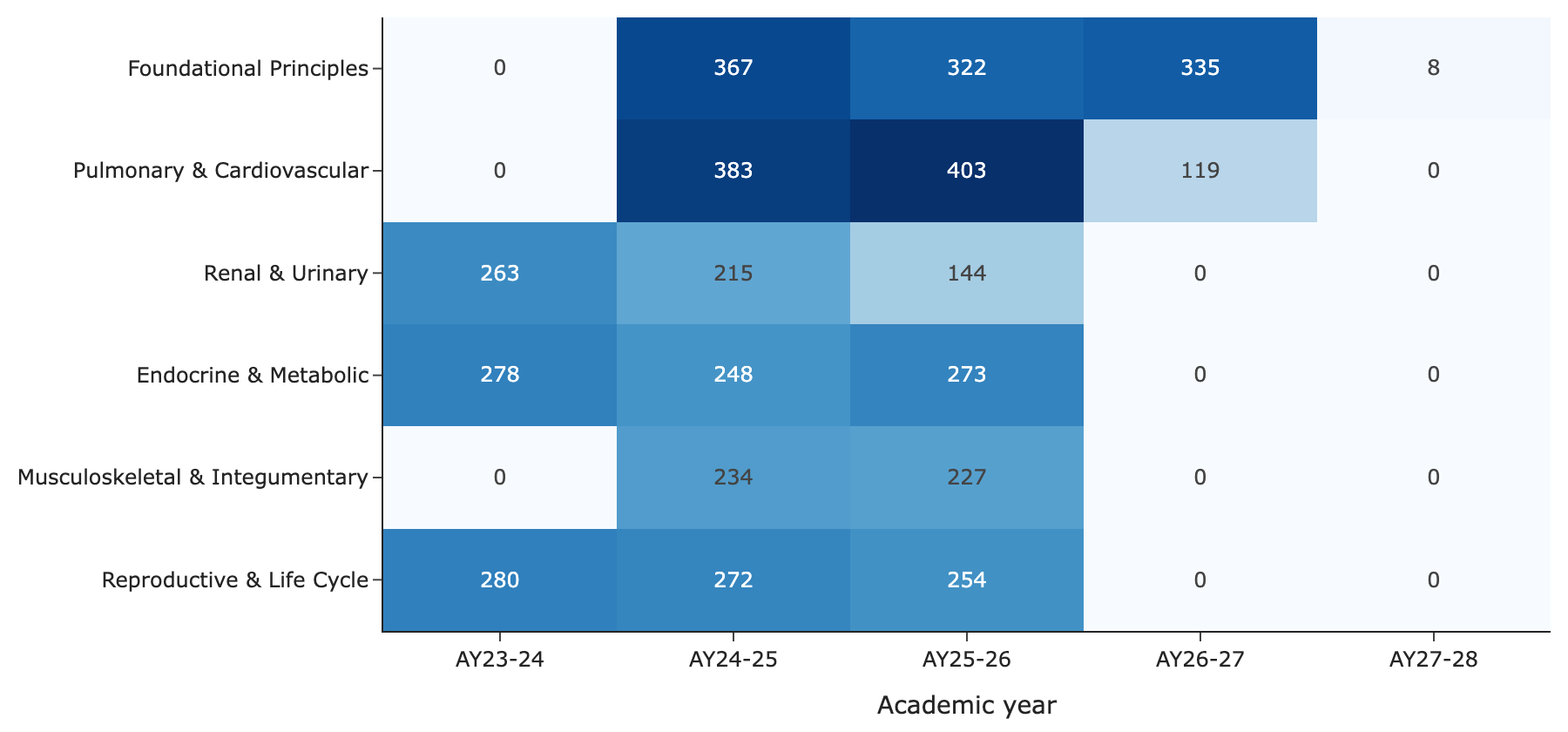
Figure 1 shows the teaching files by course and academic year. AY23-24 materials are present for three of the six courses, and Foundational Principles and Pulmonary & Cardiovascular already have AY26-27 materials in progress. Across all years the library covers four streams: the medical-science tracks at the two campuses (AMC and FCB), the Health & Society (H&S) pillar and the DOCS clinical-skills pillar. As Table 1 shows, most of the 74 GB is not text. PowerPoint decks account for about 51 GB, largely embedded images and media, and 95 videos for about 18 GB, while the extracted text comes to roughly 107 million characters. The 1,868 decks with speaker notes matter more than their size suggests, because the notes often carry the explanation that the slide itself leaves out.
| Type | Files | GB | Slides/pages | With speaker notes |
|---|---|---|---|---|
| Slides | 2,392 | 51.4 | 105,385 | 1,868 |
| 1,173 | 2.5 | 26,209 | 0 | |
| Word | 1,026 | 1.6 | 6,087 | 0 |
| Video | 106 | 18.7 | 0 | 0 |
| Spreadsheet | 67 | 0.0 | 305 | 0 |
| Other | 27 | 0.0 | 0 | 0 |
How the materials connect to the curriculum
Each course keeps a set of Course Build workbooks holding the schedule (events, dates and instructional method), the learning objectives for each event, and a build tracker for each campus. Methods follow the AAMC Curriculum Inventory lists and systems follow the USMLE content outline, so the workbooks can be read programmatically. Materials were matched to events mostly by comparing event folder names with event titles. Objectives are written once, against the AMC event titles, and FCB events use them through the matching AMC title.
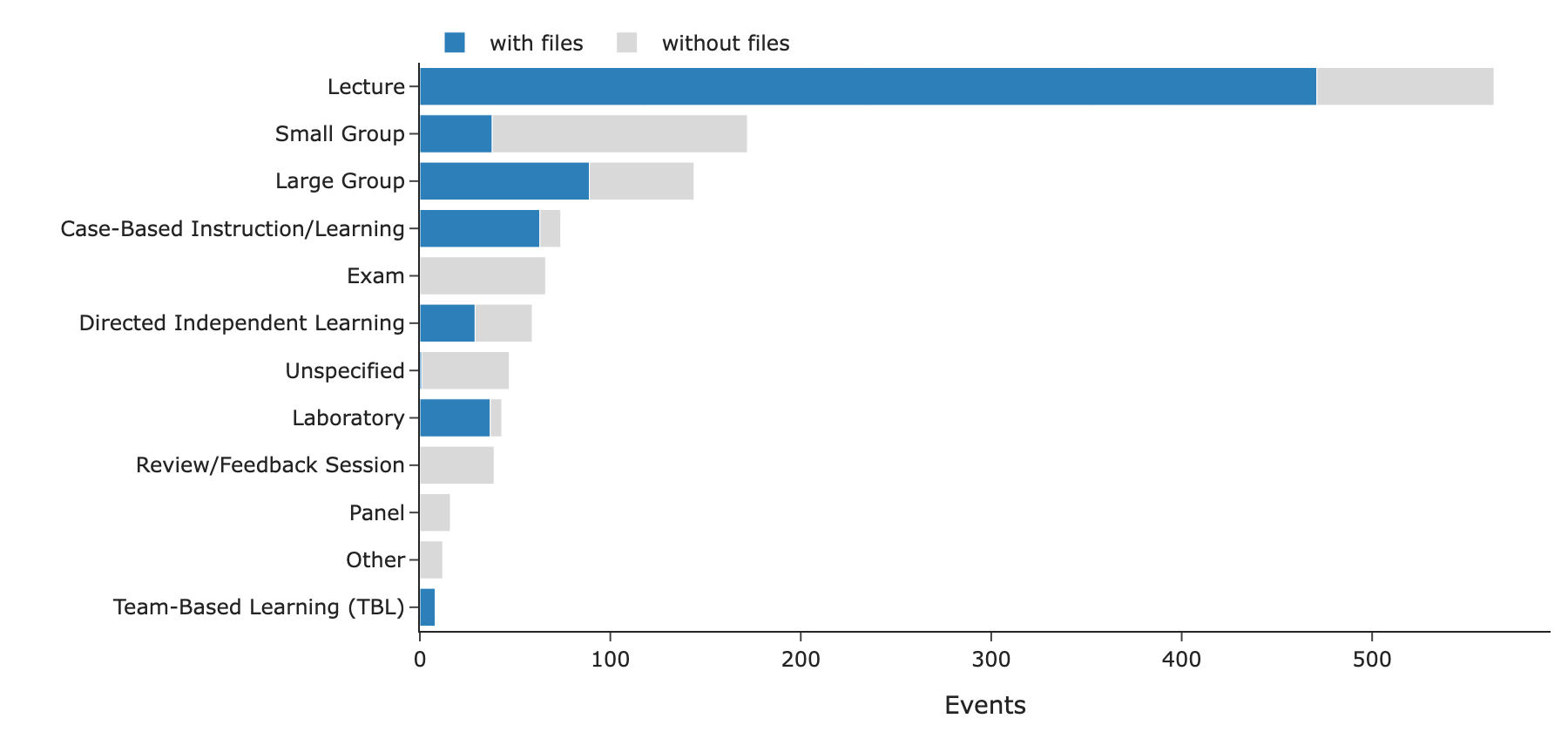
Because instructional method is recorded for 96% of sessions, coverage can be broken down by method with no additional coding (Figure 2). Lectures, labs, case-based sessions and TBL are well represented. Most small groups, reviews and panels have no files in this library, and their materials may be in Canvas or may reuse the lecture decks; exams have no files here, as expected.
The build trackers point to a few gaps and one opportunity. About 190 events are marked “Uploaded” or “Final” but have no file we could link. Some of these will be matching errors on our side, while others may have materials stored elsewhere, including in a separate FCB library. The same build-status column could drive a build-progress dashboard, showing which sessions have final materials. At present it has several spellings of similar values (“Uploaded”, “uploaded”, “Uploaded-A”) and some blank rows, so a short agreed list of values would be enough to make it usable.
What the objectives say
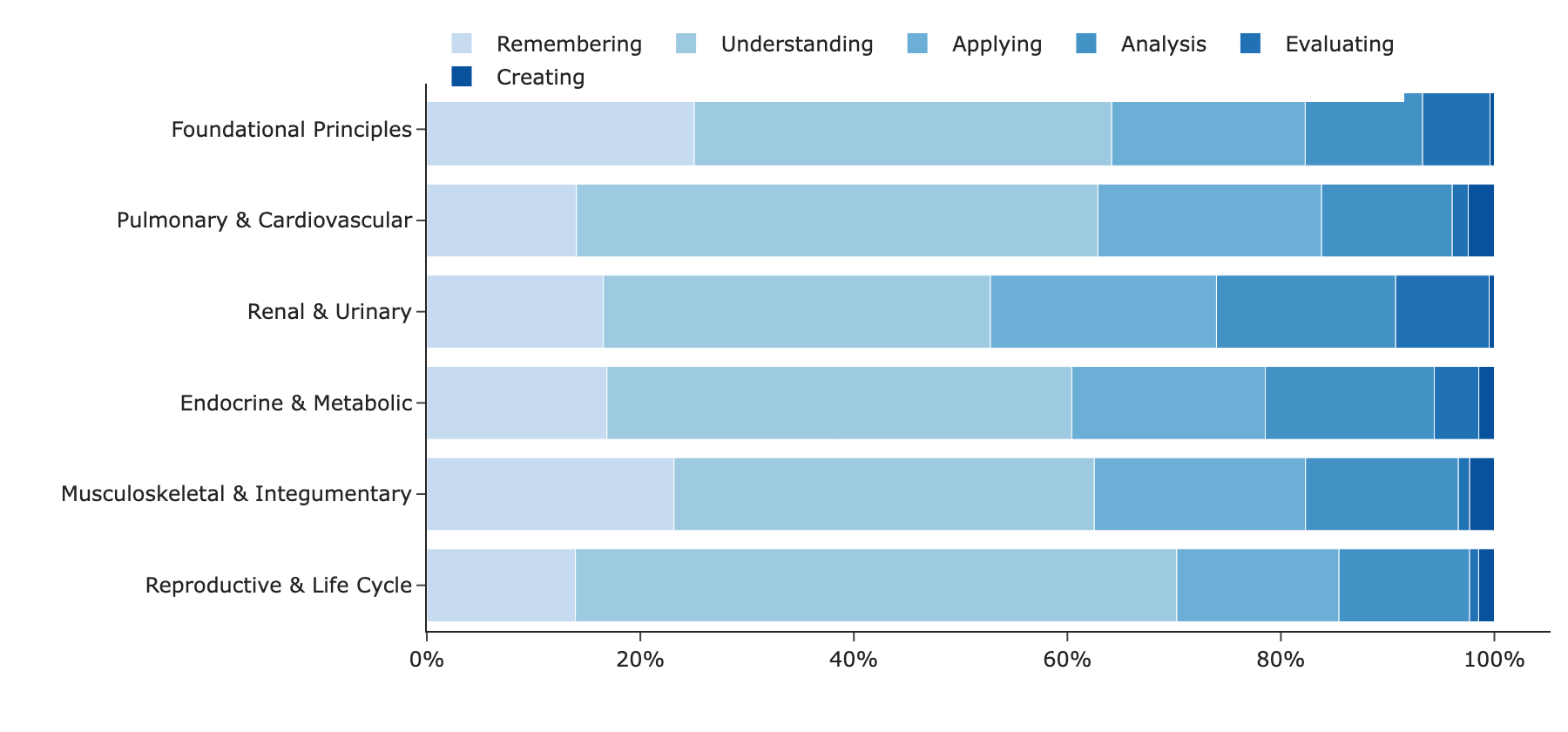
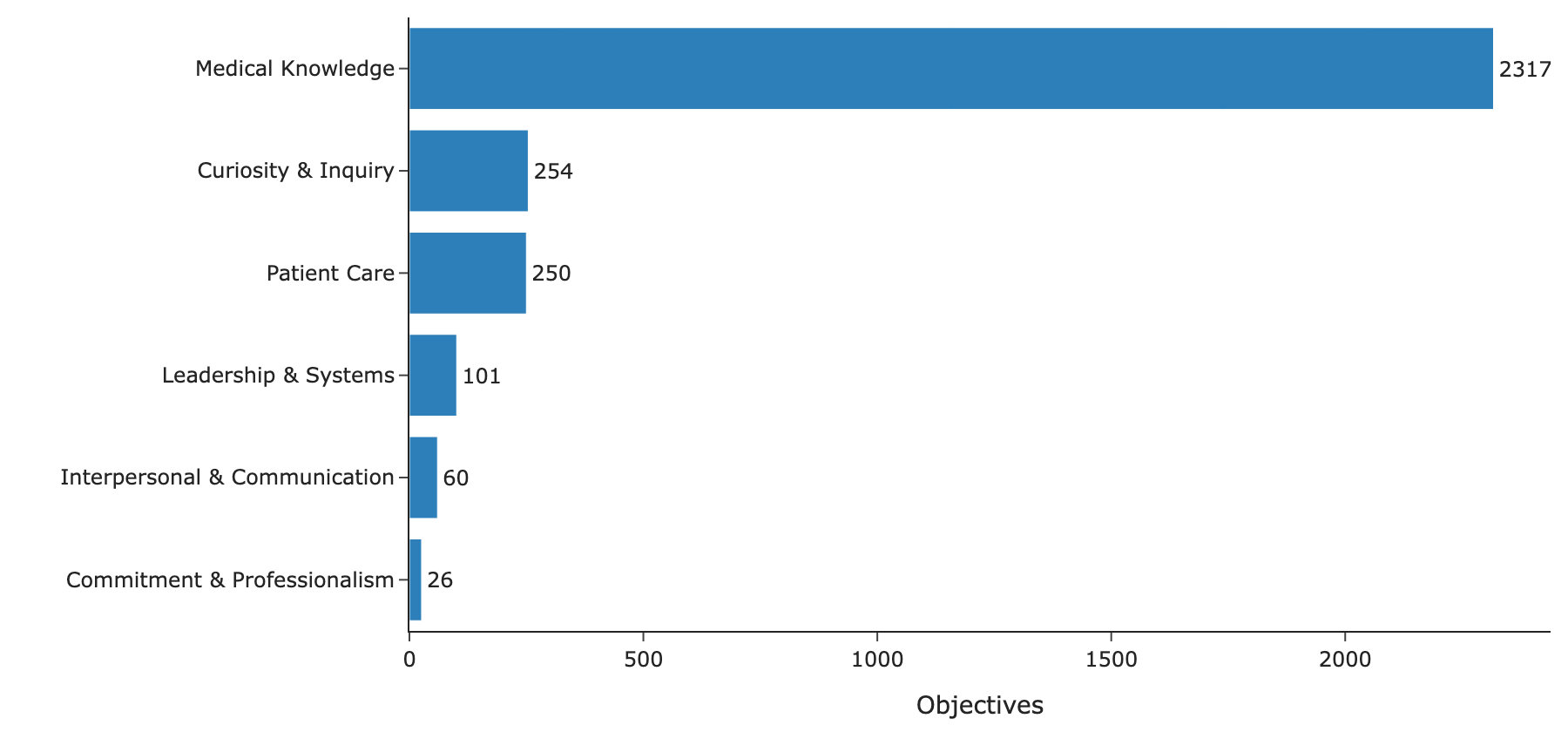
Figure 3 and Figure 4 come directly from the workbooks, which is possible only because each objective is tagged against the same vocabularies. Medical knowledge (MK1.1) accounts for most objectives, and “Understanding” is the most common Bloom’s level in every course, with “Evaluating” and “Creating” rare. That profile is typical of preclinical systems courses. Some MEPOs appear on only one to six objectives, among them PC2.4 (diagnostic tests), PC2.7 (procedures), CMT5.1 and CMT5.5. These may well be covered in clinical courses, and a school-wide view would show whether they are.
Some USMLE systems, such as Gastrointestinal and Nervous, hardly appear here and are presumably taught in other courses, so mapping gaps across the whole curriculum would need those courses’ workbooks as well. The workbooks also tag 24 clinical chief concerns, which could serve as another way for faculty to browse the curriculum.
Currency and reuse
Every file’s text was compared with every other file’s to find near-copies, even where a file had been renamed or lightly edited. The 4,584 files with text correspond to about 2,862 distinct pieces of material; the difference is mostly the same material saved for several years or campuses, or kept in more than one version.
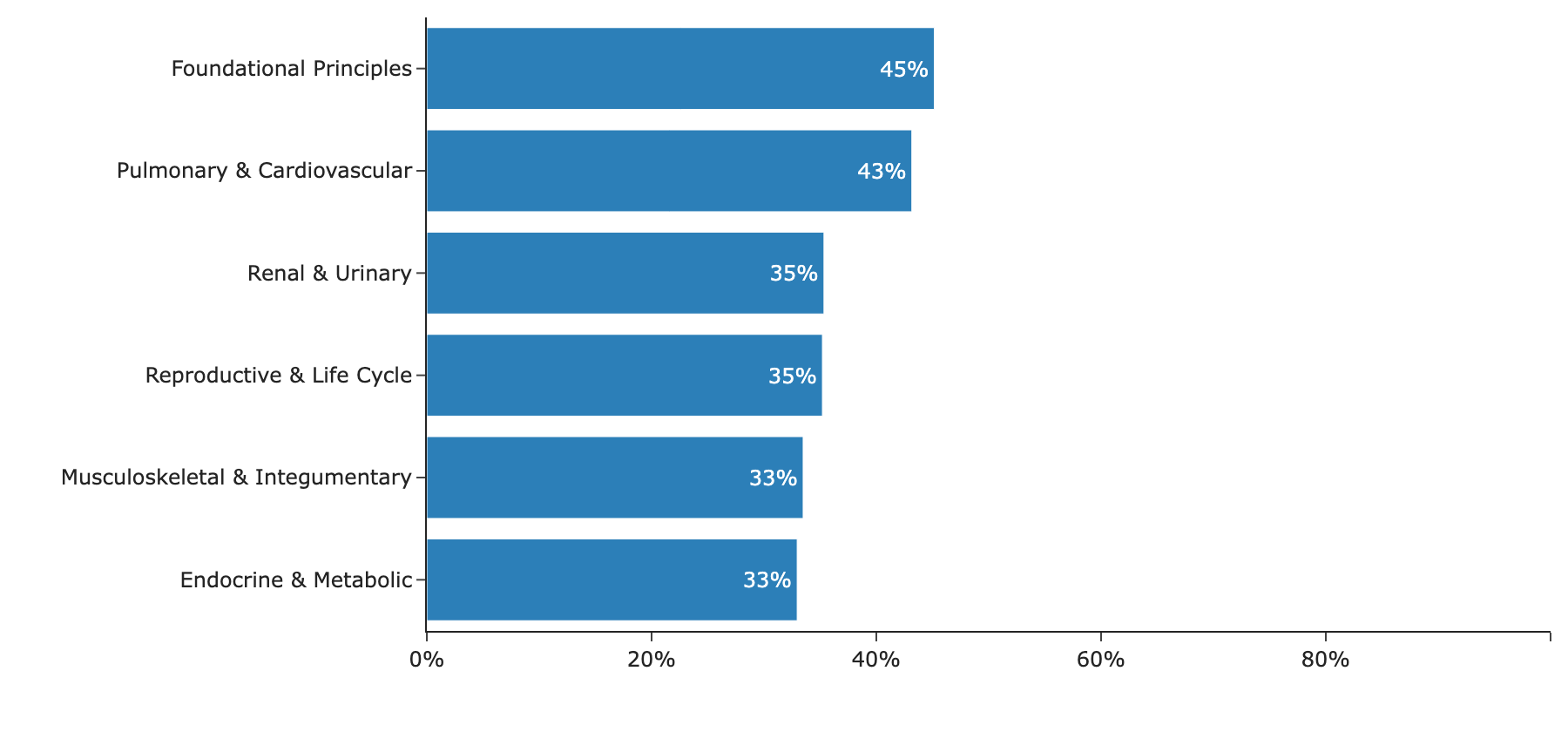
Between a third and a little under half of each course’s AY25-26 files are near-copies of an AY24-25 file (Figure 5). The rest are new or were revised by more than about 20%, which suggests a good deal of ongoing revision. The two campuses differ more. Only 7–21% of FCB files are near-identical to an AMC file, although both campuses teach to the same objectives. A view that places the two campuses’ materials for each session side by side would make it easier for course teams to share materials when they want to.
What this makes possible for faculty
Table 2 summarizes what the library could support for faculty now, and what one feature would still need. Search would cover speaker notes as well as slide text. About 8% of slides and pages are mostly images (histology, anatomy, radiology), and these can be found through their titles, notes and session, though not yet through the images themselves.
| Use | Readiness | What it would look like |
|---|---|---|
| Catalog | Ready now | Browse materials by course, week, session and objective. Links open files in SharePoint, so existing permissions still apply. |
| Search of slides, speaker notes and documents | Ready now | Find the slides and pages on a topic across courses, years and campuses, filtered by discipline, system or chief concern. |
| Curriculum mapping | Ready now | Show where each program objective, Bloom’s level, system and discipline is addressed, by course and session. |
| Comparison across years and campuses | Ready now | For a given session, show last year’s materials and the other campus’s version, and what changed. |
| Build-progress dashboard | After a small change | Track which sessions have final materials, once build-status values are standardized. |
Proposed next steps
- Build a faculty prototype. Start with a catalog and slide-level search for one or two courses, developed with their course directors so that it answers the questions they actually ask. The prototype needs no new data access and links back to SharePoint, so existing permissions apply.
- Add the FCB library. Bringing in the FCB materials would complete the picture for both campuses and support the side-by-side session view described above.
- Extend to the rest of the curriculum. The same approach applies to other courses with Course Build workbooks, which would allow objectives, systems and chief concerns to be mapped across the school.
- Agree on build-status values. A short standard list would let the build trackers feed a build-progress dashboard directly.
Just for fun: two other views
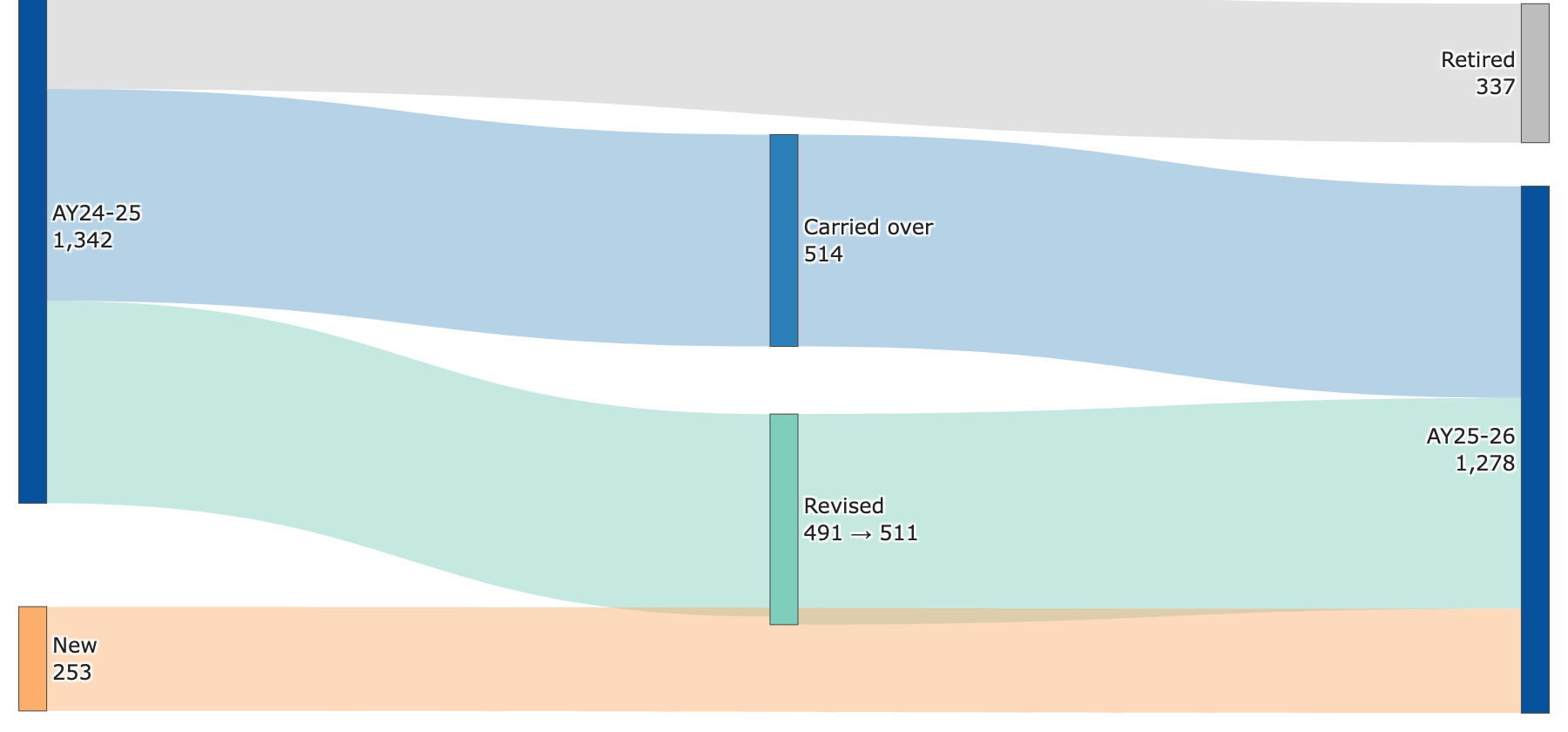
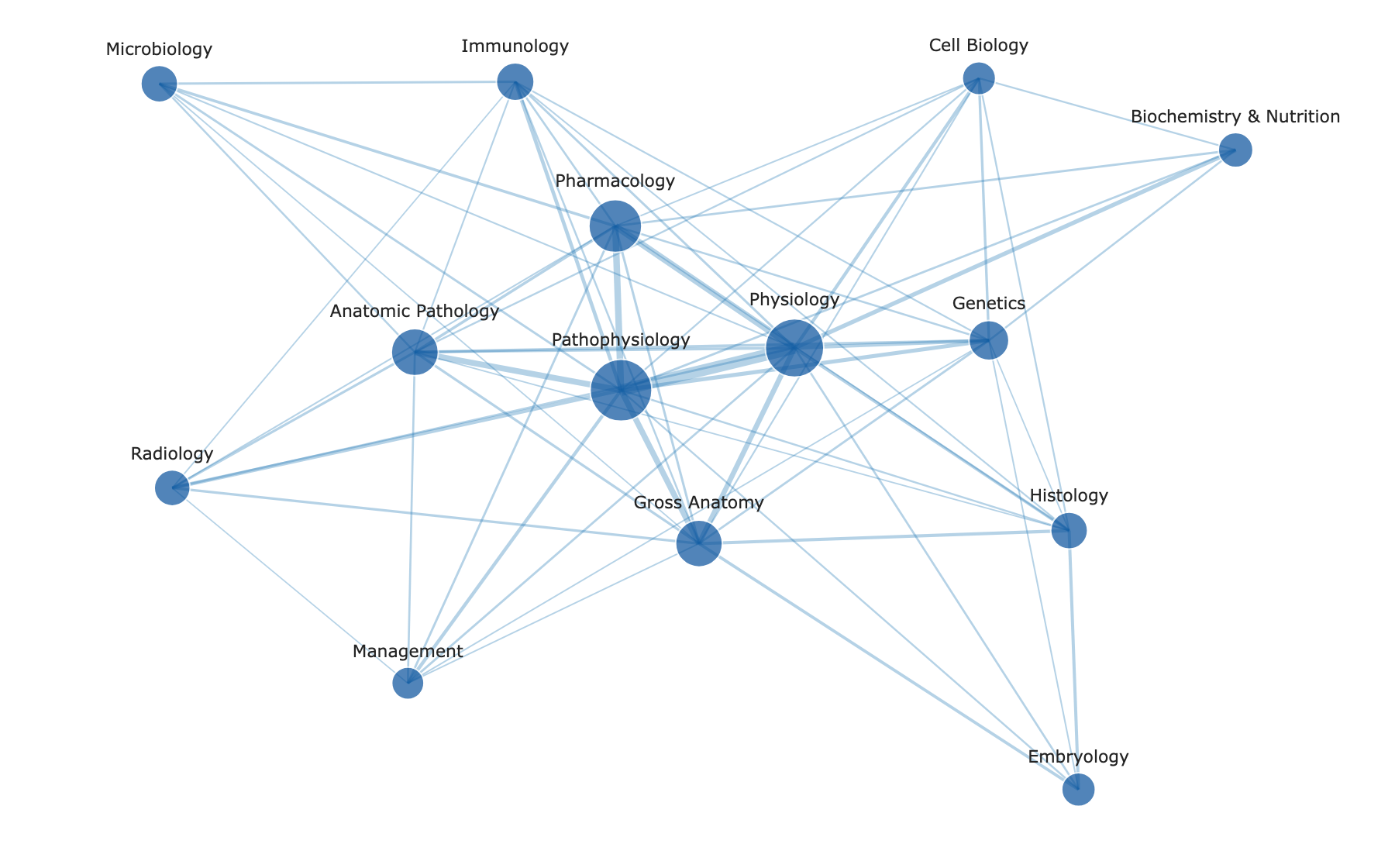
These two figures are not needed for the assessment, but they show other ways the same data can be explored. Figure 6 follows each distinct piece of material from AY24-25 into AY25-26. A material counts as revised when it did not carry over but the same session had materials in both years, as retired when its session had no materials the following year, and as new when it belongs to a session that had no materials the year before. Seen this way, most of the change between years is revision of existing sessions rather than turnover. Figure 7 shows which disciplines are taught together. Two disciplines are joined when they are both tagged on the objectives of the same session, and thicker lines mean more shared sessions. Physiology, pathophysiology and pharmacology form the core of the network, with anatomy, pathology, radiology and the other disciplines connected to it, which reflects the integrated design of the systems courses.
Appendix: methods and caveats
- Source. The “Plains Curriculum” SharePoint library, synced locally and read without modification. The inventory uses file-system metadata only. Text was extracted locally with open-source tools: MarkItDown for slides and spreadsheets (keeping slide numbers and speaker notes) and LiteParse for PDF and Word files (keeping page numbers). No content was sent to an external service.
- Structure. Course, year, campus or pillar, week, event and file type (for example prework or facilitator guide) were read from folder and file names. File-type tags are pattern-based and approximate.
- Events and objectives. Taken from the Course Build workbooks (Planning, LOs and Granular Build). Instructor names and contact details were not extracted.
- Linking. Files were matched to events by dated folder names, by fuzzy matching of folder names to event titles (checked against week and pillar), by H&S session codes, and at the week level for DOCS. Spot checks found the links accurate, but some errors are likely.
- Near-copies. MinHash estimates of overlap in five-word shingles, with a threshold of Jaccard ≥ 0.8. A heavily revised deck counts as changed even if its topic is unchanged.
- Snapshot. Counts reflect the library on the report date. The pipeline can be re-run to update them.